A Lightshot alternative for Mac that uploads nothing
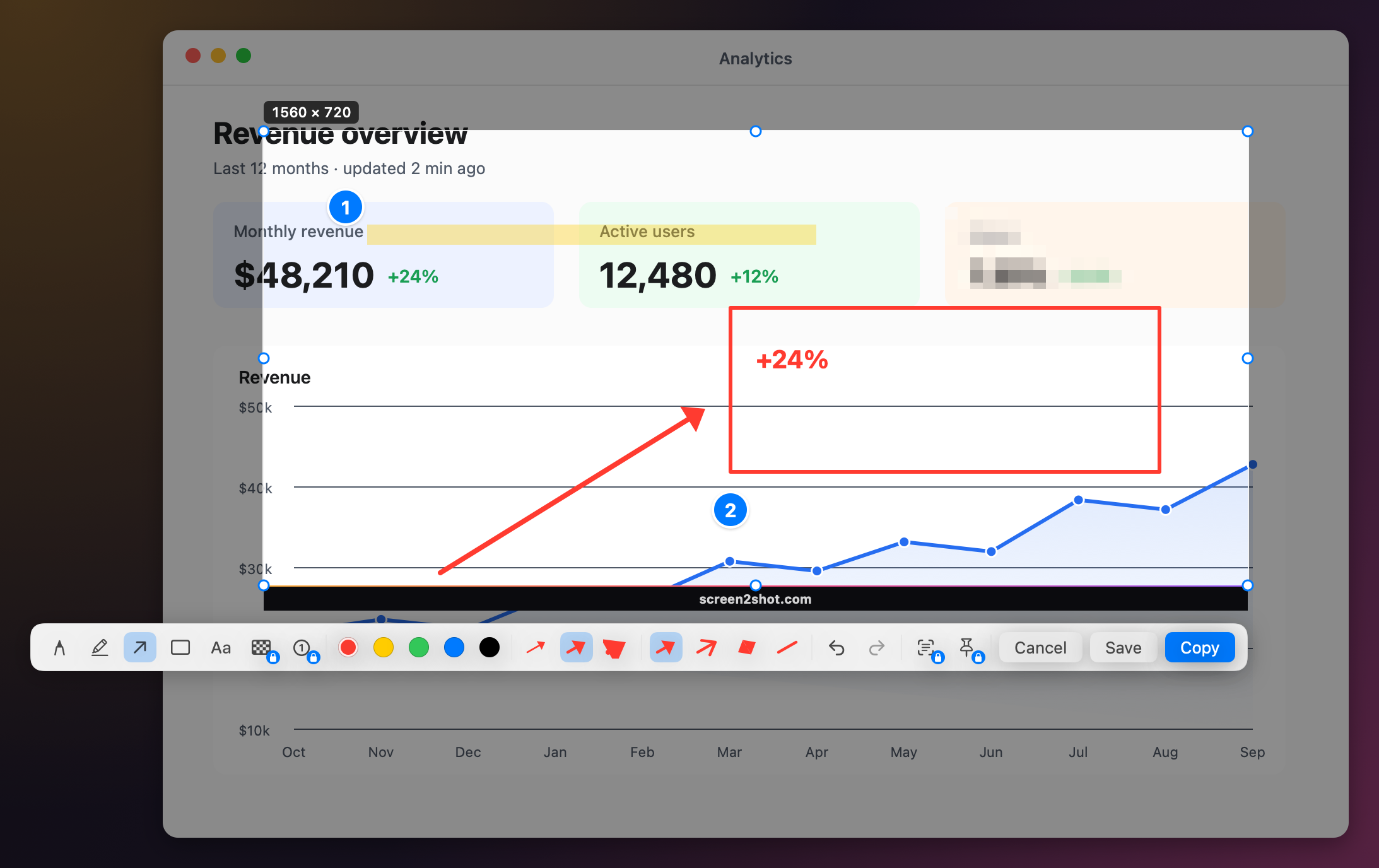
Quick answer: Screen2Shot is a Lightshot alternative for Mac with the same move, drag an area and mark it up next to the selection, and no upload at all. Lightshot's Mac app was last updated in 2019, and its privacy policy says every uploaded image is public. Screen2Shot's screenshots and markup are free. Lightshot is still the pick for one-click public links and for Windows.
Why people look for a Lightshot alternative on Mac
- The Mac app has not changed since 2019. The Mac App Store lists Lightshot Screenshot 2.22, released on 2019-07-26, for macOS 10.7 or later. Its Windows version and browser extensions are a separate story; this page is about the Mac.
- It may not work on a current macOS. A Mac App Store review dated 2025-09-28 reads: “DO NOT install this on MacOS 26 Tahoe yet, when you try to take any screenshot, all it shows you is your desktop with no content.” That is one user’s report, not our test.
- Uploads are public. Lightshot’s upload gives you a short prnt.sc link in one click, and its privacy policy says every uploaded image is public, even one in your gallery.
- The developer shares no privacy details with Apple. The App Store listing says the developer “has not provided details about its privacy practices and handling of data to Apple.”
Lightshot vs Screen2Shot
| Feature | Lightshot (Mac) | Screen2Shot |
|---|---|---|
| Price | Free | Free, with a thin Screen2Shot strip at the bottom of free exports; PRO 5.99 USD a month or 79.99 USD once from the website (Direct download) |
| Area screenshot | ✅ | ✅ ⇧⌘9, on any display |
| Whole-display screenshot | not listed on its site | ✅ |
| Quick editor next to the selection | ✅ | ✅ pen, marker, arrow in four styles, rectangle, text |
| Upload and short link | ✅ prnt.sc, public by its privacy policy | ❌ nothing is uploaded |
| Similar image search | ✅ | ❌ |
| Pixelate and numbered steps | not listed on its site | ✅ PRO |
| Copy text and QR codes | not listed on its site | ✅ PRO, ⇧⌘C |
| Pin a screenshot to the screen | not listed on its site | ✅ PRO |
| Screen recording | not listed on its site | ✅ free up to 1080p, up to 4K with PRO |
| Account | only for a gallery of uploads | none |
| Platforms | Windows, Mac; extensions for Chrome, Firefox, IE and Opera | Mac only |
| Last Mac update | 2019-07-26 (version 2.22) | version 1.1 (2026) |
| macOS | 10.7 or later (App Store listing) | macOS 14 Sonoma for screenshots, macOS 15 Sequoia for recording; Apple silicon only |
Checked on 2026-09-30. Sources below.
Recording needs macOS 15 Sequoia or later. Direct download: Sold through Stripe (Onelink is the merchant of record). Taxes are included where they apply.
What happens to a screenshot you upload
Uploading is optional in Lightshot: the App Store description says that after capturing “you can upload picture to prntscr.com server and get nice short link”. Once a picture is there, the privacy policy is plain about who can see it:
- “Every image uploaded (even if it was uploaded to your gallery) to this website is public.”
- “Every image can always be accessed and viewed by anyone who types in that exact URL.”
- “No image uploaded to this website is ever completely hidden from public view.”
So a screenshot of an invoice, a chat or a dashboard shared through a prnt.sc link is only as private as its short URL. The policy names support@skillbrains.com for deletion requests.
Screen2Shot has no upload step to get wrong. There is no account and no server: ⌘C puts the screenshot on the clipboard, ⌘S saves a PNG where you choose, and you paste it into the chat or ticket yourself. To hide part of a screenshot before you send it, PRO pixelates the area.
What it costs
Both are free to use. Lightshot has no paid tier on the Mac App Store. Screen2Shot’s screenshots, markup and screen recording are free, with a thin Screen2Shot strip at the bottom of free exports. PRO removes the strip and adds Pixelate, numbered steps, Copy Text, Pin to Screen, Recent Screenshots and Studio effects. PRO Lifetime is paid once: 79.99 USD from the website, active on 1 Mac at a time and movable at any time, with a 30-day refund window. Website purchases have no Family Sharing.
Who should pick which
- Keep Lightshot if it still works on your Mac, you want a public link in one click, or you use the same tool on Windows and in the browser.
- Pick Screen2Shot if you want the same drag and mark up move on macOS 14 or later, with nothing leaving your Mac, plus screen recording in the same app.
- Pick something else if your Mac is older than macOS 14 or has an Intel chip: Screen2Shot needs macOS 14 Sonoma and Apple silicon. Shottr and Flameshot, below, run on older macOS.
Coming from Windows: Skitch and Greenshot
People who used Lightshot, Greenshot or the Snipping Tool on Windows often look for the same tool on a Mac.
- Skitch (Evernote) is free on the Mac App Store, with arrows, text, shapes and pixelate. Its listing was last updated on 2020-07-07.
- Greenshot is free and open source on Windows. Its own site describes a Windows tool; the Mac App Store has a Greenshot listing at 1.99 USD, last updated on 2020-06-29.
- The Snipping Tool habit: Win+Shift+S has no Mac twin under that name. Screen2Shot’s ⌃⇧S preset uses the same keys with Control in place of the Windows key; the Snipping Tool for Mac page maps the rest.
How to switch
- Quit Lightshot, or free its shortcut in its preferences.
- Open Screen2Shot and grant Screen Recording permission when macOS asks; that permission is what lets any app capture the screen.
- Press ⇧⌘9, or pick another preset in the menu under Shortcut ▸: ⌃⇧9, ⌃⇧S or ⇧⌘2.
- Drag an area, mark it up with the toolbar under the selection, then press ⌘C to copy or ⌘S to save a PNG.
Pictures you uploaded to prnt.sc stay there; delete the ones you no longer want public through Lightshot’s support address above. Prices are on the pricing page.
Other Lightshot alternatives for Mac
- Shottr: free for most features, with scrolling capture, text recognition and pinned screenshots; Basic is 12 USD once. Runs on macOS 10.15 and later.
- Monosnap: screenshots, recording and short links through its own cloud, free for non-commercial use; links need a login.
- Flameshot: free and open source on macOS, Windows and Linux, with arrows, blur, counters and a command line.
- The built-in Screenshot app: ⇧⌘4 captures an area and ⌃⇧⌘4 copies it; ⇧⌘5 opens the toolbar. It uploads nothing.