
Free screen recorder for Mac, with system audio and no watermark
Screen2Shot records a whole display or an area you drag, with system audio and your microphone. Free recordings save as MP4 up to 1080p, with no watermark and no time limit. PRO adds Studio effects (auto zoom on clicks, a smooth cursor, backgrounds) and 4K export. Recording needs macOS 15 or later.
Coming soon to the Mac App StoreSee what's free
How recording works
- Press ⌥⇧⌘9, or choose Record Screen or Record Area in the menu. Recording starts at once, with no countdown.
- Turn on System Audio or Microphone in the Recording menu if you need sound.
- The menu-bar icon becomes a red dot with the time. Press ⌥⇧⌘9 again to stop.
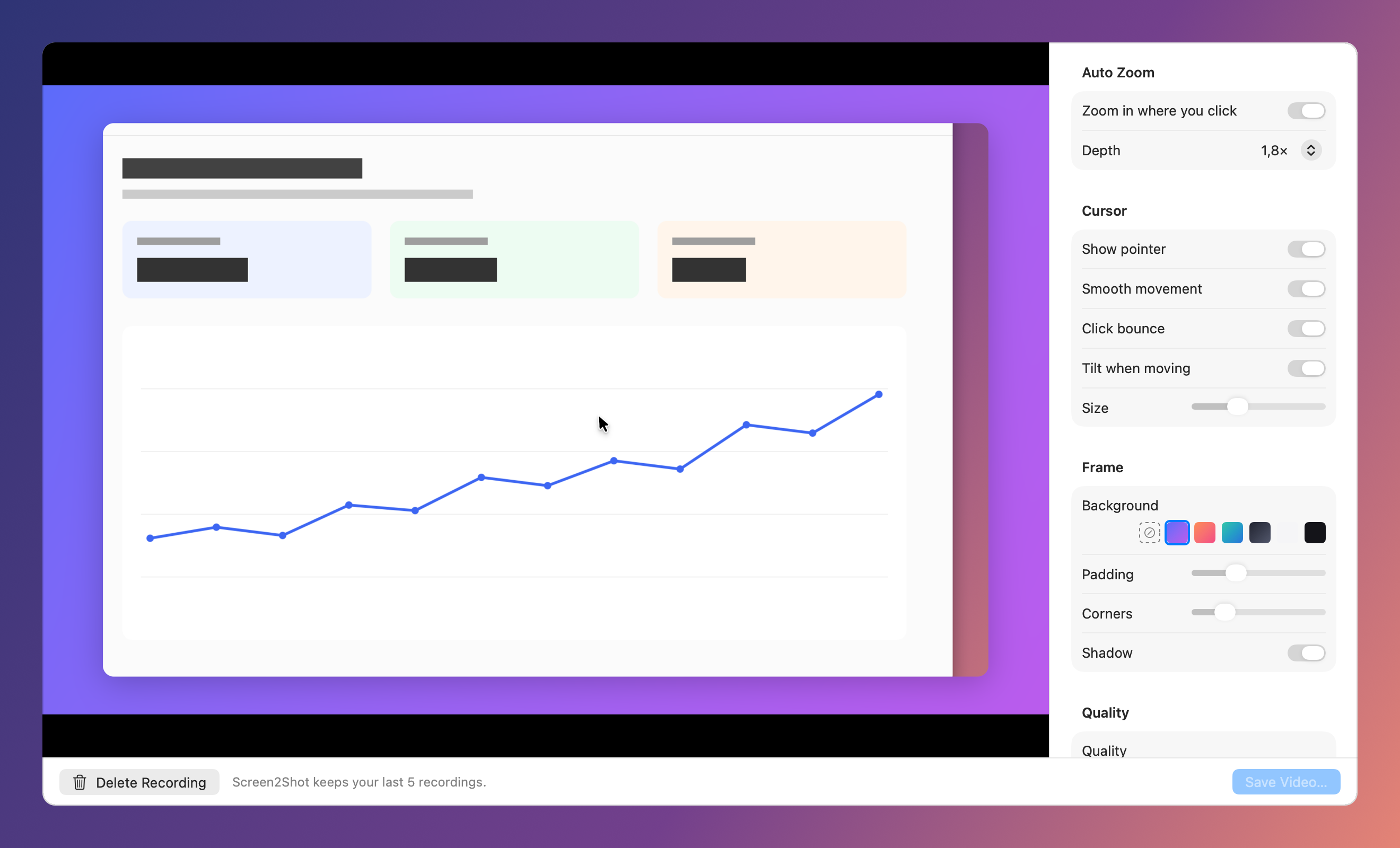
- Studio opens. Choose the look, then Save Video writes an MP4.
Studio: what you preview is what you save
Auto zoom moves in where you clicked and follows the pointer. The cursor is drawn again from the recorded movement, so it can be smoothed, enlarged and given a click bounce. Frame adds a background, padding, rounded corners and a shadow.
Clean by default
Screen2Shot's own windows and the pointer never appear in the raw video. Free exports have no watermark and no time limit.
Screen recording
| Feature | Plan |
|---|---|
| Record the screen or an area | Free |
| System audio and microphone | Free |
| MP4 up to 1080p | Free |
| Auto zoom on clicks | PRO |
| Smooth cursor and click effects | PRO |
| Backgrounds, padding, corners, shadow | PRO |
| Original quality up to 4K | PRO |
At a glance
| Shortcut | ⌥⇧⌘9 (press again to stop) |
|---|---|
| What it records | The display under the pointer, or an area you drag |
| Audio | System audio and microphone, each a switch |
| Free export | MP4 up to 1080p, no watermark, no time limit |
| PRO | Auto zoom on clicks, smooth cursor and click effects, backgrounds, padding, corners, shadow, export up to 4K |
| Kept on your Mac | The last 5 recordings |
| Requirements | macOS 15 Sequoia or later, Apple silicon |
Screen2Shot and the built-in recorder
| macOS Screenshot app | Screen2Shot Free | Screen2Shot PRO | |
|---|---|---|---|
| Record the screen or an area | ✅ ⇧⌘5 | ✅ ⌥⇧⌘9 | ✅ |
| System audio | macOS 27 or later | ✅ macOS 15 or later | ✅ |
| Microphone | ✅ | ✅ | ✅ |
| File format | MOV | MP4 up to 1080p | MP4 up to 4K |
| Click highlight | Black circle around the pointer | ✗ | ✅ Smooth cursor, click bounce |
| Auto zoom where you click | ✗ | ✗ | ✅ |
| Backgrounds, padding, corners, shadow | ✗ | ✗ | ✅ |
Questions
How do I record my Mac screen with sound?
Turn on System Audio in Screen2Shot's Recording menu, then press ⌥⇧⌘9. Add Microphone to narrate. System audio recording needs macOS 15 or later.
Is there a watermark or a time limit?
No. Free recordings export as MP4 up to 1080p with no watermark and no time limit.
What does PRO add to recordings?
Auto zoom on clicks, the smooth cursor with click effects, backgrounds and padding, and export at original quality up to 4K.
Where are recordings stored?
In the app's folder on your Mac. The last 5 are kept; Save Video writes the MP4 wherever you choose.