A Screen Studio alternative for Mac that also takes screenshots
Quick answer: Screen2Shot is a Screen Studio alternative for people who want screenshots and screen recording in one Mac app, and the option to pay once. It is free; PRO is 6.99 USD a month or 99 USD once on the Mac App Store. Screen Studio is still the better choice if you need timeline editing, a webcam or GIF export.
Why people look for a Screen Studio alternative
- No one-time purchase for new buyers. Screen Studio’s FAQ says “purchasing one-time licenses was possible in the past, but is no longer available for new purchases.”
- The subscription price. Screen Studio costs 29 USD a month billed monthly, or 9 USD a month billed yearly.
- Export needs an active plan. Its download page says: “If you don’t have an active plan, you can still use all the features except for exporting video files.”
- It records video only. screen.studio describes a “macOS screen recorder” and lists no screenshot tool, so still images need a second app.
- It is Mac-only. The FAQ says there are “no near-future plans to add Windows support”. Screen2Shot is Mac-only as well, so it does not solve this one. Cap and Recordly, listed below, run on Windows.
Screen Studio vs Screen2Shot
| Feature | Screen Studio | Screen2Shot |
|---|---|---|
| Area screenshots with markup | ❌ | ✅ free: pen, marker, arrow, rectangle, text |
| Copy Text, Pin to Screen, Pixelate | ❌ | ✅ PRO |
| Screen recording | ✅ | ✅ free |
| System audio and microphone | ✅ | ✅ |
| Auto zoom on clicks | ✅ | ✅ PRO |
| Add, move and resize zooms by hand | ✅ | ❌ |
| Smooth cursor and cursor size after recording | ✅ | ✅ PRO |
| Backgrounds, padding, shadow | ✅ | ✅ PRO |
| Trim, cut and speed | ✅ | ❌ |
| Webcam | ✅ | ❌ |
| iPhone and iPad recording | ✅ | ❌ |
| Transcript generation | ✅ | ❌ |
| GIF export | ✅ | ❌ |
| Shareable links | ✅ | ❌ (nothing is uploaded) |
| Export quality | 4K 60fps | up to 1080p free, up to 4K with PRO |
| Export without paying | ❌ (needs an active plan) | ✅ up to 1080p, no watermark, no time limit |
| One-time purchase | ❌ for new buyers | ✅ PRO Lifetime |
| macOS | Ventura 13.1 or later recommended | macOS 14 Sonoma for screenshots, macOS 15 Sequoia for recording; Apple silicon only |
| Windows | ❌ | ❌ |
| Price | 29 USD a month billed monthly, or 9 USD a month billed yearly | Free; PRO 6.99 USD a month or 99 USD once on the Mac App Store; 5.99 USD a month or 79.99 USD once from the website (Direct download) |
Checked on 2026-09-29. Sources below.
Recording needs macOS 15 Sequoia or later. PRO Monthly on the Mac App Store: Renews every month until you cancel it in your App Store account settings. Direct download: Sold through Stripe (Onelink is the merchant of record). Taxes are included where they apply.
What you keep and what you give up
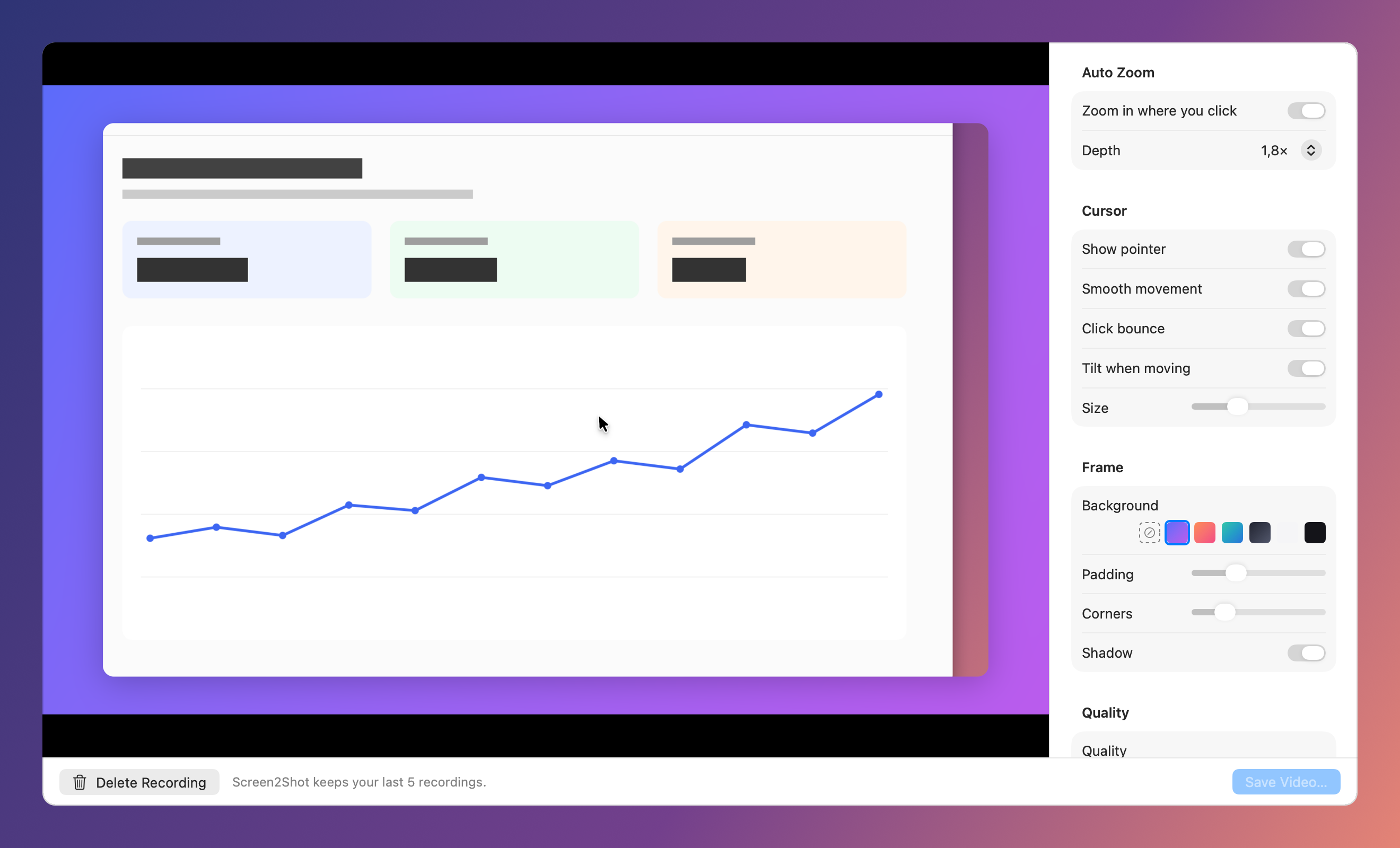
What you keep. Screen2Shot records the screen without the pointer and draws it again from the recorded movement, the same approach Screen Studio’s FAQ describes. That is what lets PRO smooth the cursor, add a click bounce and change its size after you stop. Auto zoom zooms in where you clicked, with a Depth setting. Frame adds a background, padding, rounded corners and a shadow. System audio and the microphone are two switches under Recording ▸ in the menu.
What you give up. Screen2Shot’s Studio sets the look of the whole recording; it has no timeline. You cannot add or move a zoom by hand, trim, cut or change speed, and there is no webcam, iPhone recording, captions, GIF export or motion blur. Timeline editing, trim, speed, captions, a webcam, GIF export and motion blur are on Screen2Shot’s backlog, not in the app. There are no share links either: Screen2Shot uploads nothing.
What you gain. Screenshots in the same menu-bar app: press ⇧⌘9, drag an area, mark it up, press ⌘C. The pen, marker, arrow, rectangle and text tools are free. PRO adds Pixelate, numbered steps, Copy Text (⇧⌘C), Pin to Screen and Recent Screenshots. A free recording exports up to 1080p with no watermark, and PRO Lifetime on the Mac App Store is shared with your family through Family Sharing.
When Screen Studio is still the right choice
- You edit after recording: move zooms, trim mistakes, speed up slow parts.
- You record a webcam, an iPhone or an iPad.
- You need captions, a GIF, a share link or a vertical video straight out of the app.
- You already own a one-time Screen Studio license: the FAQ says it stays valid.
- Your Mac runs macOS 13 or 14: Screen2Shot records only on macOS 15 Sequoia or later, and only on Apple silicon.
How to switch
- Export the Screen Studio projects you want to keep. Screen2Shot’s Studio opens recordings made in Screen2Shot; it has no import.
- In Screen2Shot’s menu, open Recording ▸ and turn on System Audio and Microphone if you want sound.
- Press ⌥⇧⌘9 to record the display under the pointer, or choose Record Area… and drag a rectangle. Recording starts at once.
- Press ⌥⇧⌘9 again to stop. Studio opens with the recording playing.
- Set Auto Zoom, Cursor, Frame and Quality, then choose Save Video… to export an MP4 to your Movies folder.
For screenshots, press ⇧⌘9; the capture shortcut can be changed in Settings. Prices for both channels are on the pricing page.
Other Screen Studio alternatives
- CleanShot X: screenshots and recording in one Mac app; version 5.0 (2026-09-01) added Studio Mode with smart zooms and trimming. Basic is 35 USD once with one year of updates.
- Cap: open-source recorder for macOS, Windows and Linux; free for personal use, with auto zoom in its Studio Mode. The Desktop License is 29 USD a year or 58 USD once.
- Recordly: free and open source for macOS, Windows and Linux, with auto zoom and cursor animations.
- FocuSee: auto zoom and cursor effects for Mac and Windows, with monthly, yearly and lifetime plans.