A CleanShot X alternative for Mac with free screenshots and recording
Quick answer: Screen2Shot is a CleanShot X alternative for people who want free area screenshots with markup and free screen recording, from the Mac App Store. PRO is 6.99 USD a month or 99 USD once there. CleanShot X is still the better choice if you need scrolling capture, cloud links, GIF export or video trimming.
Why people look for a CleanShot X alternative
- No free version. CleanShot’s FAQ: “We don’t provide a trial, but we do have a 30-day money-back guarantee.”
- Updates for one year. CleanShot Basic is 35 USD once and includes one year of updates; after that, updates need the optional renewal at 19 USD a year.
- Unlimited cloud is a subscription. CleanShot Pro, with unlimited Cloud storage and team features, is 10 USD per user a month, billed annually.
- Where you buy it. CleanShot X is sold on cleanshot.com, with devices managed in its License Manager, or as part of a Setapp subscription. If you want the purchase tied to your Apple Account instead, Screen2Shot’s primary channel is the Mac App Store.
CleanShot X vs Screen2Shot
| Feature | CleanShot X | Screen2Shot |
|---|---|---|
| Free version | ❌ (30-day money-back guarantee) | ✅ screenshots, markup and recording up to 1080p |
| Area and full-screen capture | ✅ | ✅ |
| Window capture | ✅ | ❌ |
| Scrolling capture | ✅ | ❌ |
| Self-timer | ✅ | ❌ |
| Pen, arrow, rectangle, text | ✅ | ✅ free |
| Pixelate | ✅ | ✅ PRO |
| Blur | ✅ | ❌ (pixelate only) |
| Numbered steps | ✅ | ✅ PRO |
| Copy text and read QR codes | ✅ (30+ languages) | ✅ PRO, ⇧⌘C |
| Pin a screenshot to the screen | ✅ | ✅ PRO |
| Capture history | ✅ (up to 1 month) | ✅ PRO (last 10 screenshots) |
| Cloud upload and share links | ✅ (1 GB on Basic, unlimited on Pro) | ❌ (nothing is uploaded) |
| Screen recording to MP4 | ✅ | ✅ free up to 1080p, up to 4K with PRO |
| System audio and microphone | ✅ | ✅ |
| Webcam | ✅ | ❌ |
| Show keystrokes | ✅ | ❌ |
| Click effects | ✅ | ✅ PRO (click bounce) |
| Auto zoom in recordings | ✅ (Smart Zooms, version 5.0) | ✅ PRO |
| Smooth cursor, backgrounds | ✅ | ✅ PRO |
| Trim and motion blur | ✅ | ❌ |
| GIF export | ✅ | ❌ |
| Where to get it | cleanshot.com, Setapp | Mac App Store, Direct download |
| macOS | macOS 13.0 or newer | macOS 14 Sonoma for screenshots, macOS 15 Sequoia for recording; Apple silicon only |
| Price | Basic 35 USD once (one year of updates, then optional 19 USD a year); Pro 10 USD per user a month, billed annually | Free; PRO 6.99 USD a month or 99 USD once on the Mac App Store; 5.99 USD a month or 79.99 USD once from the website (Direct download) |
Checked on 2026-09-29. Sources below.
Recording needs macOS 15 Sequoia or later. PRO Monthly on the Mac App Store: Renews every month until you cancel it in your App Store account settings. Direct download: Sold through Stripe (Onelink is the merchant of record). Taxes are included where they apply.
What you keep and what you give up
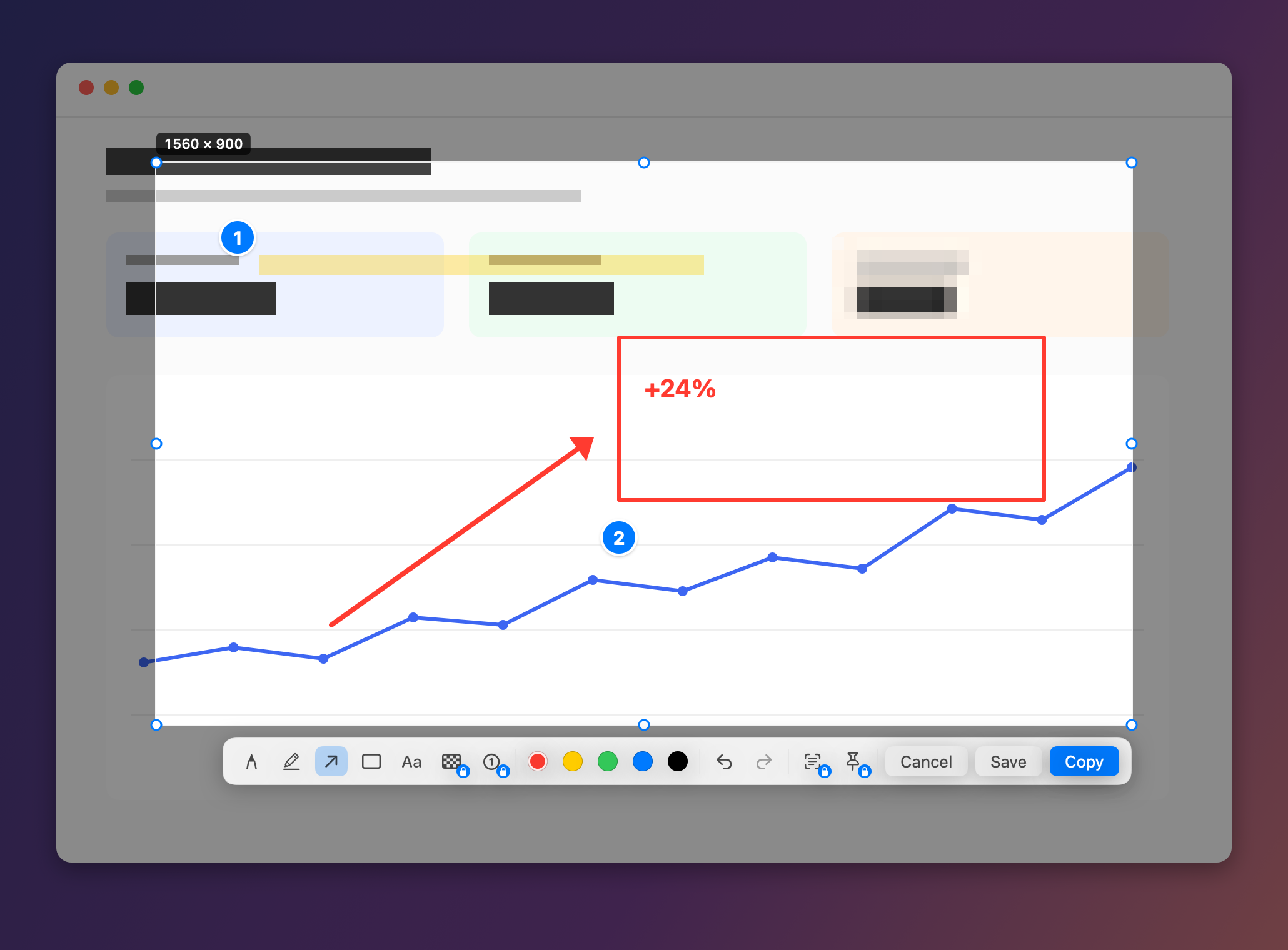
What you keep. The capture-and-mark-up loop: press ⇧⌘9, drag an area, draw with the pen, marker, arrow, rectangle or text in five colours, then press ⌘C or Return to copy. PRO covers the tools CleanShot users reach for most: Pixelate (B), numbered steps (N), Copy Text for text and QR codes (⇧⌘C), Pin to Screen and Recent Screenshots. Recording has system audio, the microphone and, with PRO, auto zoom, a smooth cursor and backgrounds.
What you give up. Scrolling capture, window capture, the self-timer, blur (Screen2Shot hides text by pixelating), keystroke and webcam overlays, trimming, motion blur, GIF export and cloud links. Recent Screenshots keeps the last 10 screenshots, where CleanShot keeps history for up to a month.
What changes. The screenshot tools most people use every day are free, not behind a purchase. Nothing is uploaded: there is no account and no cloud. PRO Lifetime on the Mac App Store is shared with your family through Family Sharing.
One thing that is no longer a difference: auto zoom. CleanShot X 5.0 (2026-09-01) added Studio Mode with Smart Zooms, so both apps zoom recordings for you.
When CleanShot X is still the right choice
- You capture long pages or chats with scrolling capture, or single windows.
- You share by link: CleanShot Cloud uploads a screenshot or recording in one click, and Pro adds a custom domain and team management.
- Your recordings need a webcam, keystrokes on screen, trimming or a GIF.
- Your Mac runs macOS 13, CleanShot’s minimum: Screen2Shot needs macOS 14 Sonoma and Apple silicon.
- You already own a CleanShot license or use Setapp.
How to switch
- Quit CleanShot X or free its shortcuts first. If a shortcut you pick in Screen2Shot is still held by another app, Settings says it is already used by another app, and the previous shortcut keeps working.
- Press ⇧⌘9, or pick another preset in the menu under Shortcut ▸: ⌃⇧9, ⌃⇧S or ⇧⌘2.
- Drag an area, mark it up and press ⌘C to copy, or ⌘S to save a PNG.
- Press ⌥⇧⌘9 to record the display under the pointer; press it again to stop, and Studio opens. Save Video… exports an MP4.
Your CleanShot capture history and Cloud links stay with CleanShot. Screen2Shot’s Recent Screenshots starts with your first screenshot in it. Prices for both channels are on the pricing page.
Other CleanShot X alternatives
- Shottr: a 2.4 MB screenshot app for macOS 10.15 and later, with scrolling capture, text recognition, QR codes and pinned screenshots; most features are free. Its site lists no screen recording.
- Screen Studio: a screen recorder with automatic zoom, a webcam and GIF export, but no screenshot tool; 29 USD a month, or 9 USD a month billed yearly.
- The built-in Screenshot app: press ⇧⌘5 for area, window and full-screen capture, a timer and screen recording; system audio is built in from macOS 27 Golden Gate.